VEM Task Management
What is this for?: For the VEM to manage tasks accordingly
What is the ideal outcome?: Tasks to be completed on time to satisfaction
What you need to know beforehand?: N/A
Why this is important?: To ensure client satisfaction
Where this is done?: In Clickup and on WordPress client instances
When is this done?: During hours of VEM availability
Who does it?: VEM
1. Review of tasks at start of day and shift
Review all Click Up cards making note of any urgent and high priority cards assigned to you. By default cards are ordered by priority from Urgent, High Priority, Normal, Low, None.
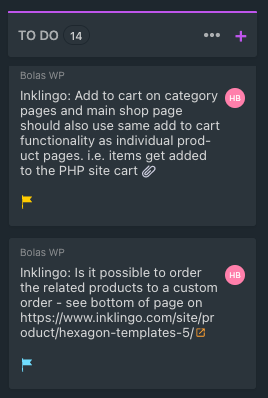
Review all cards that you expect to be less than 10-15 minutes to complete and select up to 6 "quick" cards to complete.
Check any new maintenance cards under “Recurring Maintenance” that have been allocated to you
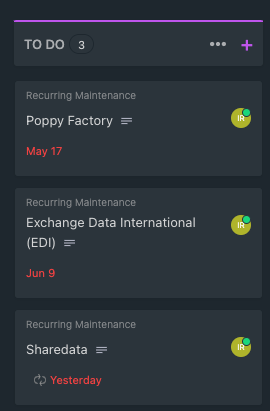
Upon completion of your review, plan your day and shift accordingly. Order of daily tasks:
Continue with any urgent pending tasks from previous day
Any other urgent and high priority task
1 maintenance task (if applicable )
Up to 6 quick cards (i.e. tasks requiring less than 15 minutes)
2. During a Task
Each task is to be moved into the IN PROGRESS column regardless of the duration of the task.
Please check if all plugin, themes and PHP are up to date. If not, create a new card for the outdated to be updated and notify Blue Flamingo.
At end of day, if task remains incomplete, keep in the IN PROGRESS column and add time spent so far on the task.
Add comment at end of day with a status update for any task remaining in the IN PROGRESS column or any challenges with the task.
If a card is not actively being worked on, move the card back into TO DO. Only active cards should be IN PROGRESS
3. Completing a Task
For each task completed please ensure the following:
Move the card to the FOR REVIEW column
Time is tracked by adding time spent on task

URL of the page is added to the comments in ClickUP
Screenshot provided of the update that has been made. A Loom video can also be provided if a demonstration of certain functionality is required.
If a technical issue, an explanation as to what the root cause of the issue was and details on the fix implemented.
4. Availability
The VEM is to be available during the agreed hours. Notice must be given of unavailability of the VEM whether this be due to sick leave, vacation or personal time-off.
During VEM’s availability, acknowledgement to email or slack messages are expected within 30 mins.
For Urgent issues that remain unresolved at the end of shift, the VEM resource can add notes to the task and notify the team. Bolas will check if it could be covered by any available developer as a maintenance task.
5. General
A maximum of 1 hour per request should be spent on R&D if required. Any additional time will need to be approved by the requestor of the ticket with an indication as to how much additional time is required. Research findings so far should also be shared
Check emails and Slack messages every 30 mins and acknowledge the message.
Time taken for reviewing the tasks and client chat to be added to VEM timesheet
An overview for BV, Kinsta and WP Engine:
https://www.loom.com/share/85d6b10f38ff4735827ef762376f00fa
Was this article helpful?
That’s Great!
Thank you for your feedback
Sorry! We couldn't be helpful
Thank you for your feedback
Feedback sent
We appreciate your effort and will try to fix the article